
Oregon VISOR Replaced VINELink
Oregon now calls its custody-notification system the Victim Information System in Oregon, or VISOR. The current portal is Oregon VISOR. A national VINELink route may still appear in old search results or instructions, but Josephine County users should follow the Oregon brand and current portal. VISOR combines a one-person custody search with notification options. It is an alert layer, not a certified archive of every booking, sentence, or past discharge.
The Josephine County Sheriff VISOR instructions say the service checks custody in county or state facilities and can give notice when a person is released or transferred. The local page also lists escape and death as notification events. Registration is available without charge by phone call, email, or text as offered by the live system. An account is optional, and anonymous registration is available. Account holders can manage contact choices, review recent notices, change personal details, and unregister.
VISOR does not cover a federal Bureau of Prisons release or provide an ICE release archive. A county booking and an ODOC sentence also remain distinct. Use the county jail record for the Josephine booking phase and Oregon Offender Search for the state-corrections phase.
Search a Josephine County Person
Start with enough identity information to avoid opening the wrong record. VISOR accepts a full or partial name, State Identification number, or County ID. A State Identification number, often called an SID, is the corrections identifier assigned by Oregon. County ID is useful when the known event began in a local jail. Names alone need careful comparison because two people can share the same spelling.
- Open VISOR and choose the individual-in-custody search.
- Enter a name, SID, or County ID. Add what the live form permits to narrow the result.
- Compare the available identifiers before opening a result. Do not merge facts from people with similar names.
- Read custody, location, status, and projected-date labels exactly as shown. Save the date and time of access.
- If the event matters as proof, confirm it with the source agency record instead of relying on the portal alone.
A missing result does not prove release. It can reflect a delayed feed, a spelling issue, an identifier mismatch, a nonparticipating source, or a custody class outside VISOR. For a Josephine County booking, compare the name and booking history in the Josephine jail inquiry. Leave its “In Custody” box unchecked when looking for an older booking.
Note: The jail inquiry’s Booking From and Booking To fields filter booking dates, not release dates.
Josephine County VISOR Fields
Labels can change as Oregon updates the portal, so the words on the live result control. A future date is a projection, not proof that release occurred. Likewise, a notification event is evidence of a reported system change, but it is not the signed judgment or the agency’s release record.
| Field or control | How to read it |
|---|---|
| Name | A search key that must be checked against other available identity details. |
| SID or County ID | An agency identifier that provides a stronger match than name alone. |
| Custody status | The status supplied by a participating custody source at that point in time. |
| Location | The reported facility or custody source, not a statement about a court case outcome. |
| Projected date | An anticipated date that may change after sentence review, credit, a hold, or a new order. |
| Request notifications | The control used to choose available event alerts and a contact channel. |
The official VISOR interface shows the search and notification workflow used for Oregon custody events.
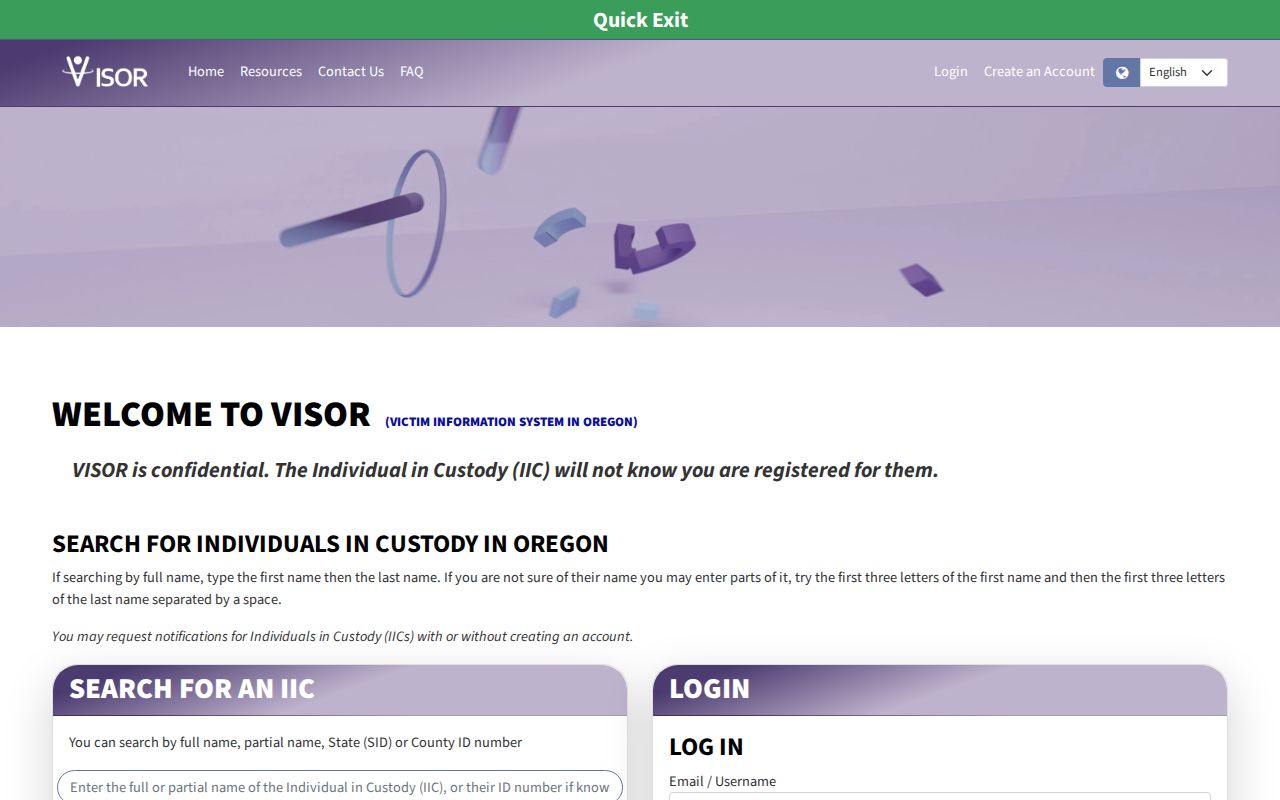
The captured interface is a navigation example. A live result must be read on the day of the search, and no dated image should be treated as a current custody statement.
Request Josephine County Release Alerts
Notification settings attach to the selected person’s record. Choose only after the identity match is sound. The county instructions allow more than one phone number or email registration and state that registration data are confidential. Keep confirmation details private because they can expose contact choices or account information.
- Open the matched record and choose “request notifications” or the current equivalent.
- Select the offered events, such as release, transfer, projected-date change, escape, or death.
- Add the phone, email, or text contact method that the portal currently offers.
- Complete the verification link, code, call prompt, or account check shown for that channel.
- Save the confirmation and update the contact information if it later changes.
Current Oregon materials do not document a universal four-digit PIN for all VISOR registrations. A PIN was part of legacy VINE telephone practice. Complete a PIN only if the live telephone channel asks for one. Email, text, and account routes may instead use their own links or codes. Inventing one common PIN step could leave a registration incomplete.
Keep a second verification path. VISOR warns against relying on one alert as the only protection measure. Contact help through the current portal if a registration or notice does not work as expected.
Confirm Josephine County Jail Release
A VISOR alert about a Josephine County event should be reconciled with the jail source. Search the jail inquiry with “In Custody” left unchecked, open the person’s history, and locate the booking block. Its Release Date can show that the booking closed. Then read the disposition, docket number, and any destination wording. A transfer closes local custody but does not mean the person entered the community.
When the public history does not state the release type, ask JCSO Records Division for the final booking sheet and custody-event or release record. Identify the person, subject or booking number, and date range. Request the actual release date and time, coded and plain-language reason, and destination or receiving authority if transferred. The records response is more useful for historical proof than a saved alert alone.
“Temporary Out of custody” also appears as a housing option in the local inquiry. It is an operational label requiring confirmation. Do not translate it automatically into final community release.
Verify an Oregon Prison Release
A Josephine County case can result in transfer to the Oregon Department of Corrections. Once ODOC admits the person, the county booking history covers only the earlier jail phase. Use Oregon Offender Search for current prison or Community Corrections status and the release-date label shown there. Search by SID when possible, or use name and identity details with care.
OOS can continue to display someone who has left a prison but remains under ODOC or local Community Corrections authority. A fully discharged former offender may not appear. For an official past event, request a face sheet, release certificate, public-information print, or other narrow record through the ODOC Public Records Center. A projected release date, physical release date, and supervision discharge date answer three different questions.
- Projected release date
- ODOC’s anticipated end of incarceration based on the sentence calculation and current information.
- Physical release date
- The date the person actually left physical custody.
- Discharge date
- The end of the sentence or supervision authority, when supported by an official record.
Note: ODOC reports that projected-date and release notifications are checked on an approximately two-hour cycle, not before every event.
Josephine Release Check Limits
VISOR is not the search for every custody system. It does not supply federal BOP release history, a complete ICE release archive, a court judgment, or a certified county release log. The federal Bureau of Prisons locator is the proper public route for many sentenced federal prisoners. ICE’s locator addresses current immigration detention and a no-match cannot be treated as release.
Timing also matters. An alert can follow source-system processing, and a projected date can change. Preserve the message header and event time, but do not publish private registration data. For a transfer, search the receiving custody system. For the broader county search and release-record chain, the Josephine County released inmates search explains how jail history, court records, and agency records answer separate parts of the question.
Match the channel to custody. JCSO confirms a county booking, OOS and ODOC records confirm a state term, and federal agencies confirm federal or immigration custody.